|
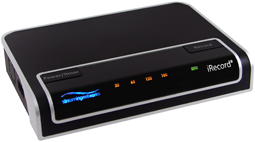
iRecord Pro
is the next generation of iRecord (PMR-100). It records free movies to
iPad, free movies to iPhone. iRecord Pro comes in 4
models:
iRecord Pro (Baseline): The new features include direct recording to
the Samsung Galaxy, iPad, iPhone, iPod including iPod touch, other
USB devices plus direct recording to a PC or Mac.
Support for direct recording to iPad is
available via a firmware upgrade at a nominal charge.
iRecord Pro (with iPad support): iRecord Pro baseline features
plus built-in iPad support.
iRecord Pro+: The Pro+ model is for business and commercial
applications. It does not have any watermarking in the recording. The
preferred recording parameters are stored automatically to flash using
the iRecord Desktop utility, allowing more control over recordings. The
unit can record for longer duration without powering off.
iRecord Pro*: The iRecord Pro*, in addition, supports video
recording to camera roll of iDevices ready for sharing via MMS and
email. To control file size, video frame-rate can be set, from a
selection, between 1-30 fps. Furthermore, the recordings can be stored
in progressively downloadable format for hosting on websites.
iRecord Pro-D: The iRecord Pro-D, in conjunction with the
supplied USB hub, supports video/audio or audio-only recording
simultaneously to multiple USB devices including iPad, iPhone, USB hard
disks and flash drives. Simply connect a USB hub to iRecord’s USB port
and multiple storage devices to the USB hub.
All models of iRecord Pro support features given below: |
|
Compare iRecord
Pro Models |